Workspace dropdown icon shifts left on hover
Issue Description
Area: Side-bar, User-created workspaces.
Steps to reproduce:
Find a user-created workspace in the AI Assistant.
Move the cursor toward the dropdown icon next to the workspace name.
On hover, the dropdown icon shifts left and an options icon appears in its original place. Just as the cursor reaches the dropdown icon, the icon moves away from under the cursor and the options icon appears where it was.

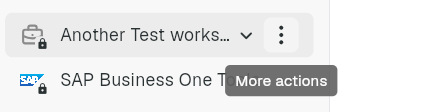
Impact: Users aiming for the dropdown icon accidentally open the options menu instead, because the target moves away at the moment of the click.
Expected behavior: The dropdown icon should stay in place when the cursor hovers over it, so the user can click the icon they are aiming for.
Status: Completed
Log in to comment and vote
No comments yet
Be the first to share your thoughts.