What your administrator decides and what you can set
English version follows in the English pass.
Written By Logiks Solutions
Last updated About 1 month ago
Why some settings are greyed out
Logiks AI Assistant is configured consistently for your whole organisation. What should be the same for everyone is decided by your administrator; what is a matter of taste or concerns only this machine belongs to you. That is why some rows in the settings window can be changed and others cannot.
Task ▸ Settings
The three sections in the settings window
Your preferences – everything you are allowed to change. These values are stored on this computer only and are never sent to the backend. On a second machine you set them again.
Settings managed by your administrator – read-only. These values come from your company configuration. They are shown not so you can change them but so you and support can see what currently applies.
Environment – technical details about your installation. Information only, nothing to set.
Hover over a centrally managed row and you get the note "Managed centrally. Contact your administrator to change it."
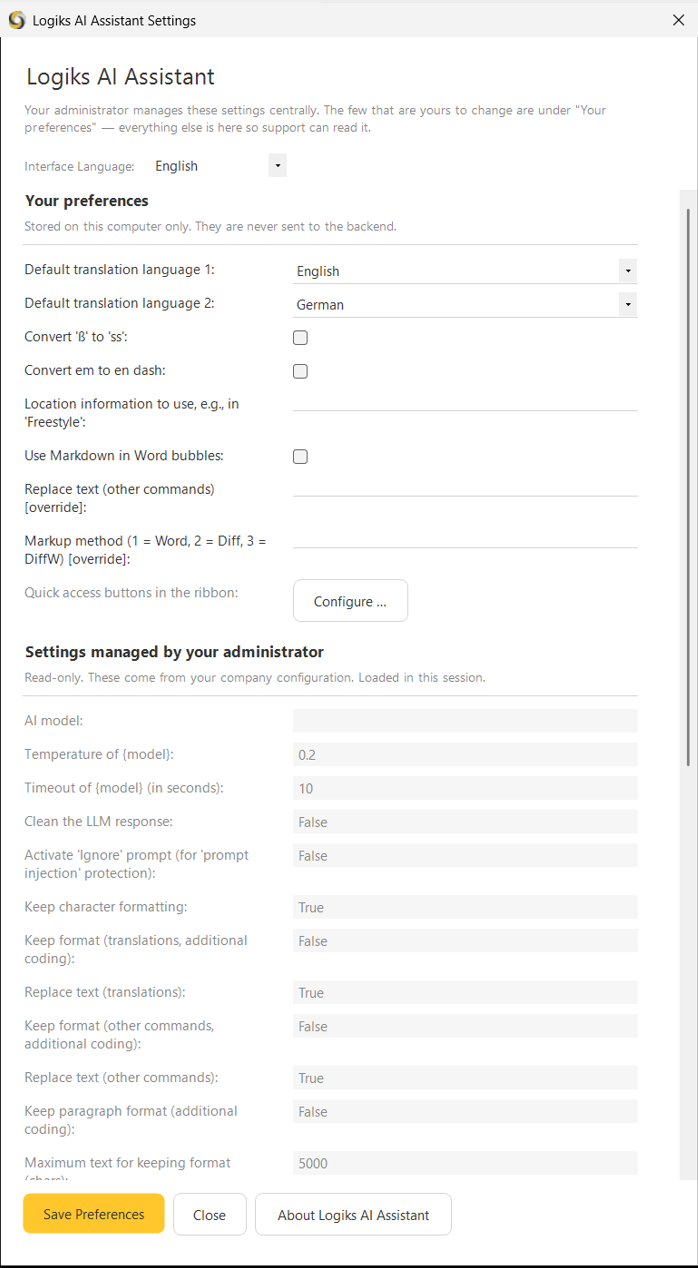
What your administrator decides
These are the things meant to keep results comparable across the organisation – and the ones that drive cost and waiting time:
AI model, Temperature and Timeout. The model determines how good and how fast the results are, the temperature how freely things are phrased, the timeout how long the add-in waits for an answer.
Whether changes are output as markup and by which method.
Whether, and up to what text length, formatting is kept.
The chat conversation memory – how much of a conversation the chat remembers.
What belongs to you
Default translation language 1 and 2 – the two languages behind the quick translation entries.
Convert 'ß' to 'ss' and Convert em to en dash – two writing conventions that differ by organisation and country.
Location information – a location that feeds into some requests so answers suit your region.
Use Markdown in Word bubbles.
The overrides: rows marked [override].
What an override is
For a few central settings there is a second row under Your preferences marked [override]. It works like this:
Leave it empty – the central value applies. If your administrator changes it, it changes for you too.
Enter something – your value applies, permanently and on this machine only.
This exists for the markup method and for replace text – the two decisions where the way of working really is a matter of taste: whether you would rather have changes straight in the text or as a revision to look over.
When a central value does not suit you
Talk to your administrator. The settings window shows you the value in force so you can say precisely what you need – a different model for long documents, say, or a higher timeout.
Related articles
Where to find Logiks AI Assistant on your ribbon
Limits, caps and what happens when you hit them
Was this helpful?
Still need help? Ask the team