Anonymising selected text by terms
Placeholder
Written By Logiks Solutions
Last updated About 1 month ago
What this does
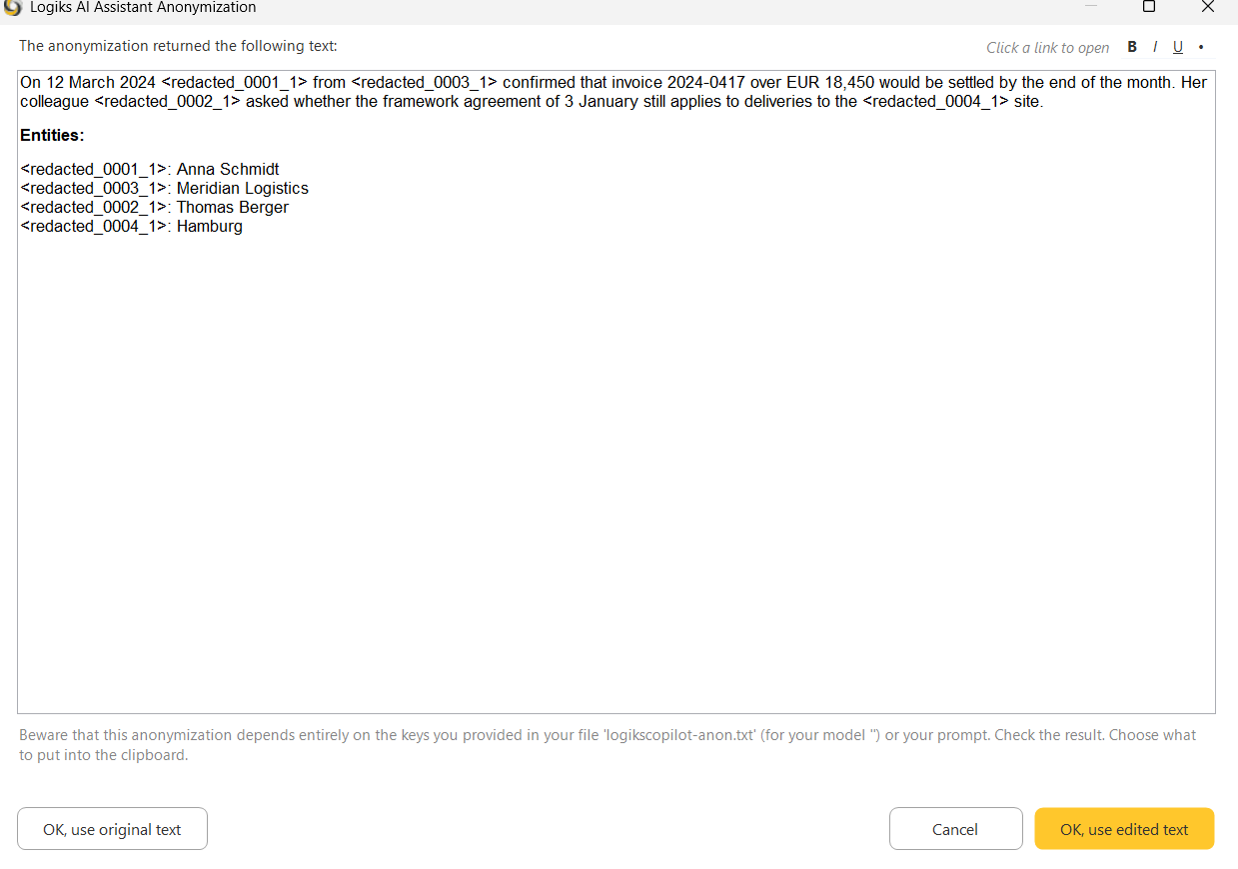
Anonymize Text (terms) replaces exactly the terms that were configured beforehand in the selected text – each with a placeholder such as <redacted_0001_1>. You get the anonymised text in a window, together with the list of which placeholder stands for which term, and you can take it into the clipboard.
An important difference from the AI variant: there is no artificial intelligence here at all. Text patterns are searched for and replaced, on your own machine. The text does not leave the machine in the process.
Where to find it
Task menu ▸ Anonymize ▸ Anonymize Text (terms)
Select the text first.
What it replaces – and what it does not
It replaces only what is in the configuration or what you type in. It recognises nothing by itself. Put "Smith" in and "Smyth" stays, and so does "smith", unless the rule is written to catch it.
That is also its strength: what you named is replaced reliably and completely – without a model deciding whether it thinks that is necessary.
When the feature says it is not configured
If no terms are stored, the add-in reports: "No anonymization keys are set up on this machine, so term-based anonymization is unavailable. Your administrator configures it."
That is not a fault. The terms live in a file called logikscopilot-anon.txt on your desktop; without that file there is nothing to replace. The AI anonymisation in the same menu works independently of it.
The question about the type
If something is configured, the add-in asks: "Which anonymization type do you want …?"
3 – file based – only the terms from the file.
4 – prompt – you type the terms yourself; the ones from the file are prefilled. Separate several terms with commas. An asterisk stands for any further letters or digits (
Meier*also catches "Meiers"). If a term contains a space, put it in quotation marks:"Anna Schmidt".
The result window
You see the anonymised text and, below it under Entities, the mapping from placeholder to original term. The note above says it plainly: the result depends entirely on the keys provided – check it.
You can still edit in the window. What you accept on closing goes into the clipboard. Your document is unchanged; you paste the text yourself wherever you need it.
The mapping list lasts only for this session
Which placeholder stands for which term is remembered only while Office is running. After closing, the mapping is gone, and <redacted_0001_1> can no longer be traced back to anybody.
If you will need the mapping later, save the entity list from the result window before you close Word.
The quiet variant: anonymisation before sending
The same terms can be configured to apply automatically to every request: the text is replaced before it leaves the building, and in the answer the placeholders are turned back into the real terms. You notice nothing of it.
Whether that is set up for you is your administrator's decision, in the same file. Do not rely on it without asking – and even then, do not rely on it covering everything sensitive. What gets replaced is what was named.
Was this helpful?
Still need help? Ask the team